mailsearch: Fast Apple Mail Search with Rust, SQLite FTS5 and MCP
The search box in the macOS Mail app often finds nothing. I type a word that I know is in a message, and I get an empty list. Mail has no setting to repair its index, and I got tired of scrolling. So I wrote my own search: mailsearch, one Rust binary that indexes the Mail store into SQLite and gives me a command-line tool, a search-as-you-type terminal screen, and an MCP server, so an AI agent such as Claude Code can search my mail too.
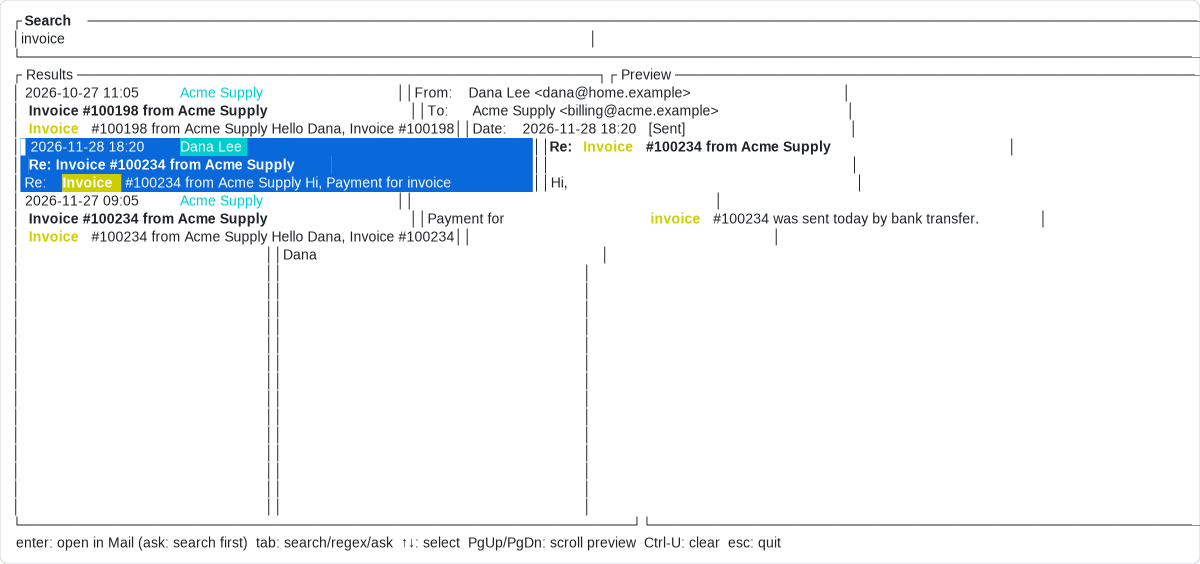
All screenshots in this post use a small, fictional demo mail store. The measurements come from my real store of about 67,000 messages.
Read the files, not the app
Mail keeps each message in one .emlx file under ~/Library/Mail. I call
this folder the Mail store. An .emlx file is simple: a first line with a
byte count, then that many bytes of standard RFC 822 email, then an XML property list that I
ignore. mailsearch reads these files directly. It does not use Spotlight, it does not touch the
database of Mail, and it never writes to the Mail store.
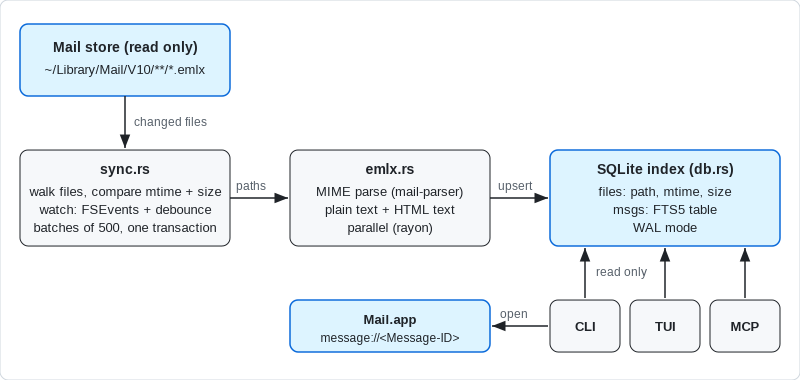
The text of each message goes into one SQLite database with FTS5, the full-text search module of
SQLite. I call this database the index. It holds From, To, Cc, Subject, and body text for
all accounts. The FTS5 tokenizer is porter unicode61 remove_diacritics 2, so
invoices also finds invoice, and cafe finds
café.
One detail that mattered more than I expected: many senders ship a stub plain-text part ("View
this email in your browser") next to the real HTML part. mailsearch adds the HTML text only when
the plain part does not already hold 80% of its words. That catches the stubs and does not store
the same body twice. I found this gap with a recall check against a raw rg scan of
the .emlx files.
Keep the index in sync
A sync makes the index equal to the Mail store. It walks every .emlx file, compares
path, modification time, and size with a files table, deletes rows for files that are
gone, and parses new or changed files on all CPU cores. It writes in batches of 500, one
transaction each, so an interrupted first run keeps what it finished.
The watch command runs that sync, then listens to FSEvents, the file change service
of macOS. After a burst of changes it waits 2 seconds and syncs again. I run it from launchd, so
new mail is searchable a few seconds after it arrives.
cargo install --path .
mailsearch index
mailsearch watch
The first index on my store printed this line:
scanned 67100 added 67100 updated 0 deleted 0 failed 113 | 66987 messages in 24.8s
The 113 failures are files with no mail headers, for example Exchange calendar items. The
process that runs mailsearch needs Full Disk Access, because macOS blocks
~/Library/Mail without it.
Search three ways
The CLI takes the FTS5 syntax: words, exact phrases, prefixes, column filters, and
AND/OR/NOT. A regex can run alone or on top of an FTS
query, and --mailbox limits the search to one mailbox.
mailsearch search 'subject:invoice NOT paid'
mailsearch search --regex 'invoice\s+#?\d{5,}'
mailsearch search invoice --regex '\$\d+'
mailsearch open 1
The part I enjoy most is ask. It turns a plain-English request into a query with
fixed rules, not a language model. The answer is the same every time and there is no delay. It
prints the parsed query first, so I can see what it understood.
$ mailsearch ask "every Monday at 10 pm"
query: Mondays 22:00–22:59
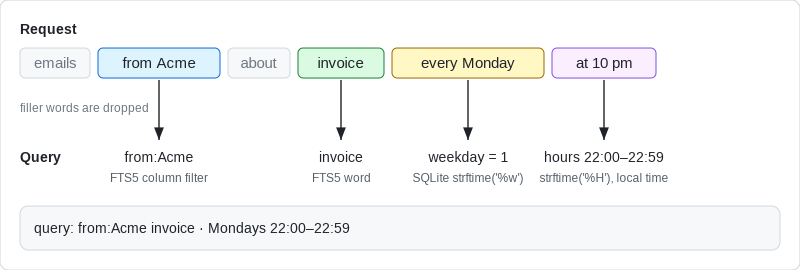
The rules know senders and recipients, relative dates (3 days ago,
last month), month names, weekdays, hours, and last email for the newest
message. A bare month name stays a keyword, so may is still searchable. The terminal
screen (TUI) has the same three modes: search, regex, and ask. Searches run on their own thread,
so typing never waits for results.
Give the mail to an agent
mailsearch mcp starts an MCP (Model Context Protocol) server with three tools:
search_mail, get_message, and open_in_mail. All three call
the same search code as the CLI and the TUI. The server talks over stdio, or over local
Streamable HTTP on 127.0.0.1:8787:
claude mcp add --transport stdio mailsearch -- ~/.cargo/bin/mailsearch mcp --transport stdio

mailsearch mcp --transport http
claude mcp add --transport http mailsearch http://127.0.0.1:8787/mcp
Two cautions. The HTTP listener uses no authentication, so any client on the same Mac can read the index. And a message can contain instructions written by its sender, so the agent must treat tool output as data, not as instructions.
Nothing leaves the Mac
Mail is private, so I wanted a hard answer here, not a promise. mailsearch uses no AI model,
local or remote: ask is fixed rules. The binary has no network client. The
dependency tree has no HTTP client or TLS crate, and hyper is built with its server
features only. The only network code is the optional MCP HTTP listener, bound to
127.0.0.1.
Then I checked it at run time. With the macOS sandbox denying all network access,
search, ask, show, index, and the MCP server
over stdio all worked. The MCP server over HTTP worked with loopback access only. You can repeat
the check:
sandbox-exec -p '(version 1)(allow default)(deny network*)' mailsearch search invoice
So the program runs on a Mac with no network at all. The install is different:
cargo install downloads crates, so for an air-gapped Mac I build on a connected Mac
and copy the binary. And the boundary is mailsearch itself. An agent that uses the MCP server
sends the tool results to its own model, and Claude Code sends them to the cloud. To keep the mail
on the Mac, use an agent with a local model. Last, open hands the message to the Mail
app, which talks to your mail servers as usual.
Numbers
Measured on an Apple Silicon Mac with about 67,000 indexed messages, Trash and Deleted Items included. Each time is one run, including process start.
| Operation | Time |
|---|---|
First index (index --rebuild) | 24.8 s |
| Sync with no changes | 1.0 s |
Word search (invoice) | 0.03 s |
One-letter prefix (a*, ranks almost every message) | 0.73 s |
| Regex over all text | 0.28 s |
New or deleted message visible with watch (test store, 300 ms wait) | 0.4 s |
| Index size | ~970 MiB |
The recall check searched two test words, and mailsearch found the same messages as the raw
rg scan. That is two words, not a benchmark, but a check of this kind is what
caught the HTML stub problem.
Limits
- Attachment contents (PDF, DOCX) are not indexed.
- Word stems are not dictionary forms:
paiddoes not findpay. Stemming is English only. - Each
watchsync walks the whole store (about 1 second). I accept that shortcut for now. askknows English month names only, and hours use the time zone of this Mac.watchunder launchd is not yet tested for a full day of live mail.
Next: search by meaning
Phase 2 adds semantic search with embeddings, stored in the same SQLite file with
sqlite-vec. A spike embedded 512 messages with BAAI/bge-small-en-v1.5
(messages per second, sequence 256, batch 32):
| Backend | Messages/s |
|---|---|
| ONNX Runtime, CPU | 22.7 |
| Core ML ML Program (fp16), CPU | 287 |
| Core ML ML Program (fp16), Neural Engine | 291 |
| Core ML ML Program (fp16), GPU | 995 |
I expected the Neural Engine to win. It did not: the GPU is about 3.4 times faster at this shape, which puts the whole store at about 70 seconds. ONNX Runtime with its Core ML provider was slower than its own CPU path, because the model splits into 38 parts and the Neural Engine does almost no work. Power use is not measured yet. The chunker is ready (up to 140 words per chunk, quotes and signatures removed), and it gives about 232,000 chunks from about 54,000 unique messages.
The code is MIT-licensed on GitHub:
github.com/mraad/mailsearch. If you live in
Apple Mail, give it a try and tell me what ask gets wrong. More to come.

Comments