An Agent Loop That Runs in the Browser: Rust, WASM and One MCP Endpoint
Can the whole agent run on the client? I mean the loop itself: the model calls, the tool calls and the context management. The server still runs the tools. But the part that decides what to do next lives in the browser tab.
gen-ai-rs is my experiment to answer that question. It is a small agent harness in Rust, compiled to WebAssembly. It talks to an OpenAI-compatible model and runs tools through one same-origin MCP endpoint. A plain question uses one model call. A question about North Sea wells draws them on an ArcGIS map.
Where this comes from
This is my third pass at the same problem.
The first was IDRIS, about two and a half years ago. It explored geospatial data with an LLM and SQL. Its text-to-SQL side came from what I learned from Vanna. There was little to copy then, so I learned the loop from the ground up, with help from OpenAI's building agents track and its practical guide to building agents.
The second was the Generative AI Toolkit. It grew out of IDRIS and became a professional services offering. It taught me what an agent really needs, and what it can do without.
gen-ai-rs is not a port of the toolkit and shares no code with it. It is a new implementation of the lessons from both. The main lesson: keep the loop small, and delete before you add.
The split between browser and server
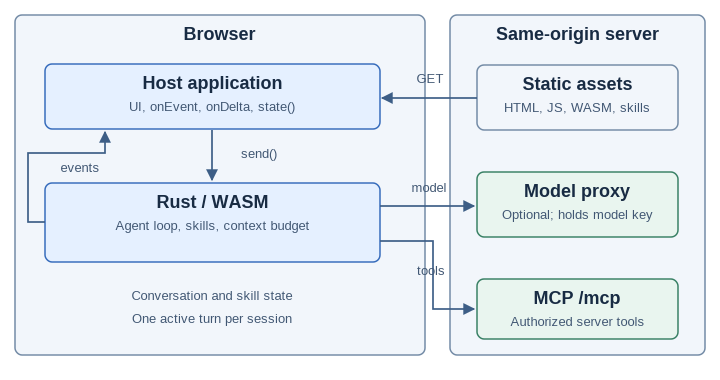
The browser holds two parts:
- The host page. It shows the UI, receives events and stores the session state.
- The Rust core. It runs the agent loop, loads skills and keeps the context inside its budget.
The server holds three parts:
- Static files. HTML, JavaScript, the WASM file and the exported skills.
- A model proxy (optional). It keeps the provider key off the page.
- The MCP endpoint,
/mcp. It runs the tools. It must validate the arguments and authorize each action.
The core never writes storage. The host saves state() after each turn and passes it back on the next create(). A damaged state value stops the session from starting. It does not silently start empty. A reload of the page restores the conversation.
The host API is short:
import init, { GaitSession } from './pkg/gait_wasm.js';
await init();
const session = await GaitSession.create({
  model: 'openai/my-model',
  apiBase: '/llm/v1',
  kbUrl: 'kb',
  mcpUrl: '/mcp',
  onEvent: event => renderEvent(event),
  onDelta: text => appendAnswer(text),
});
const result = await session.send('Multiply 6 by 7.');
One turn of the loop
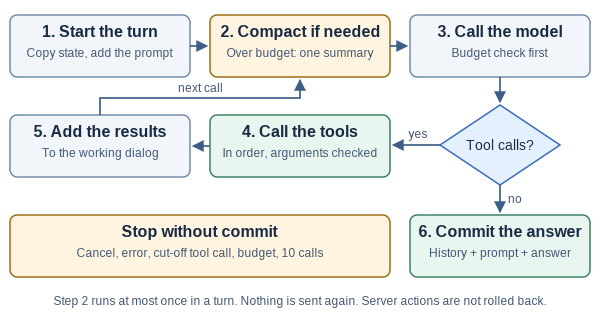
The loop does three things: model calls, sequential tool calls and compaction. Nothing more.
- The turn copies the state and adds the user prompt.
- If the local token estimate is over budget, the core summarizes the earlier turns. This happens at most once in a turn.
- The core calls the model.
- If the model asks for tools, the core runs them in order and adds the results.
- The loop goes back to step 3, for at most 10 model calls.
- A final answer commits the turn.
Some rules keep the behavior predictable:
- Only a successful turn commits. A cancelled or failed turn changes neither the conversation nor the active skills.
- Nothing is sent again. A failed model request ends the turn. A proxy or the host can retry.
- A cut-off tool call never runs. If the model hits its output limit in the middle of a tool call, the core does not guess the missing arguments.
- Tool output is capped at 30,000 characters plus a truncation marker.
- Cancel closes the HTTP requests. It cannot undo an action that the server already did.
Events go straight to the host through onEvent. Rust keeps no trace. The host decides what to keep and what to redact.
Skills, loaded only when needed
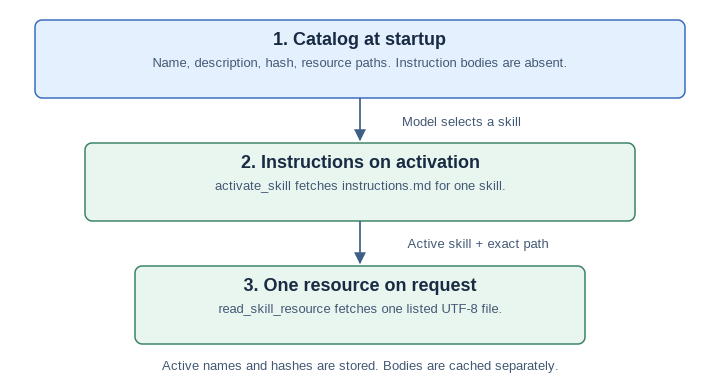
A skill is a folder with a SKILL.md file and optional resources. An exporter turns the folders into a static bundle. The core loads it in three levels:
- The catalog. At startup, the model sees only names, descriptions and resource paths.
- The instructions. The model calls
activate_skillto fetch the body of one skill. - One resource. The model calls
read_skill_resourceto fetch one listed file of an active skill.
This keeps the prompt small. The northsea-duckdb skill, for example, holds the SQL rules for the North Sea data. The model reads them only when a question needs SQL.
Tools behind one boundary: the North Sea map
All application tools go through /mcp. For the map demo, a small gateway, tools/gateway.py, sits in front of an mcp-rwee server. The gateway serves the page, adds the server token from its environment and relays the calls. The page never sees the token.
In the default narrow mode, the model gets two tools:
northsea_layersreturns a short card for each table, or the full metadata of one table.northsea_queryruns read-only SQL SELECT statements in DuckDB, with file, network and settings access removed.
A result with geometry also writes a map file. The model gets back only the row count, column statistics and 10 sample rows. The map page draws the full file.
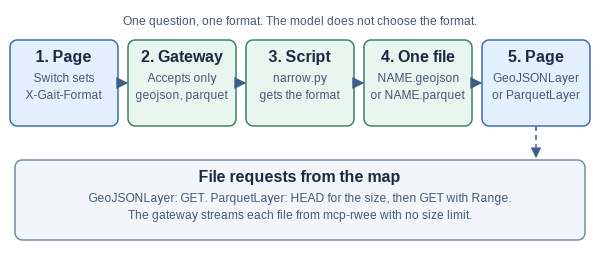
The page has a switch for GeoJSON or GeoParquet. The page sends the choice in a header. The model cannot choose the format. The map uses the ArcGIS Maps SDK for JavaScript 5.2 from the CDN, with GeoJSONLayer or ParquetLayer. There is no build step.
Here is a question I used for testing:
Show all the wells with depth > 350 m and color-code them by the z-score value of their depth.
The first version drew the wells in one color. The SQL was correct, but the map had no way to know which column to use for color. The fix was small. The skill rules now tell the model to return the value as a numeric column named color. The map page reads the minimum and maximum from the result statistics. When the values span 0, as a z-score does, the ramp goes from blue through gray to orange, centered on 0. I did not add a new tool or a new skill. One rule and one renderer setting were enough.

A live run with an Azure model and mcp-rwee on the North Sea DuckDB file: 600 wells, 4 model calls, 12,480 tokens, 9.4 seconds. The trace panel on the left shows each model call and tool call.
Token cost
Each model call sends the full history again, so large tool results cost tokens on every later step. Two changes made the largest difference:
- Table cards.
northsea_layerswith no table returns a compact card for every table, not the full metadata. - Sample rows. A result with geometry returns statistics and 10 rows. The full rows go to the map file.
On five narrow questions with an Azure model, the total went from 106,522 tokens to about 56,300. All 15 answer checks were correct before and after.
I also tried generic result shaping and a tool-call ledger at the gateway. The two changes above did most of the saving, so I removed them to keep the harness minimal.
What I removed
The project started as a bigger, extensible prototype. I removed graphs, handoffs, policy hooks, local JavaScript tools, browser embeddings, templates, queued sends, retries, harness-side storage and a retained trace buffer. For each feature, I asked one question: does the loop work without it? Most of the time it did.
The result, measured on 2026-11-08 on Apple Silicon:
| Measure | Value |
|---|---|
Rust lines under src/ (with inline tests) |
2,217 |
| WASM file, raw | 272,918 bytes |
| WASM file, gzip | 118,255 bytes |
| WASM start, warm median | 1.6 ms |
| Local MCP tool round trip, median of 20 | 0.75 ms |
These numbers do not include model latency or real network cost. A build fails if the WASM file grows over a budget of 350,000 bytes.
Try it
You need Rust with the wasm32-unknown-unknown target, wasm-pack, Python and PyYAML.
Run these commands from the repository root, in this order. The first builds the WASM package. The second exports the skills. The third starts the demo server.
wasm-pack build crates/gait-wasm --target web --release --out-dir ../../web/pkg --no-pack
python3 tools/export_kb.py fixtures/kb-src web/kb
python3 tools/demo_server.py
Then open http://localhost:8080.
Mock mode uses a scripted model and the real MCP endpoint, so it needs no key. The demo server has one harmless tool, multiply. For a real model, use any OpenAI-compatible API. For an Anthropic model, put an OpenAI-compatible proxy such as LiteLLM in front of it.
To keep the server in a sandbox, the README shows how to run it in OpenShell. The agent loop and the model calls stay in the browser on the host. The sandbox limits what the tools can reach.
What I learned
- The browser is a good place for the loop. It is close to the user, it streams well and the state stays with the page that shows it.
- The tools do not belong there. Credentials, validation and authorization stay on the server. One endpoint makes that boundary easy to see and easy to check.
- Small results beat clever context tricks. Compact cards and sample rows did more than any general mechanism I tried.
- Deleting code is a feature. Each removed part is one less thing to test, secure and explain.
The code is on GitHub under the Apache 2.0 license: mraad/gen-ai-rs. The README and the detailed guide in docs/index.html cover the host API, the MCP transport, skills, state, the gateway and the map page.

Comments