TrackAnything: Click an Object, and a DGX Spark Follows It
I want to point my Mac camera at a scene, click an object, and see a mask stay on that object while it moves. I do not want to train a model for each object. I also want to run the model on my own hardware, not on a hosted API.
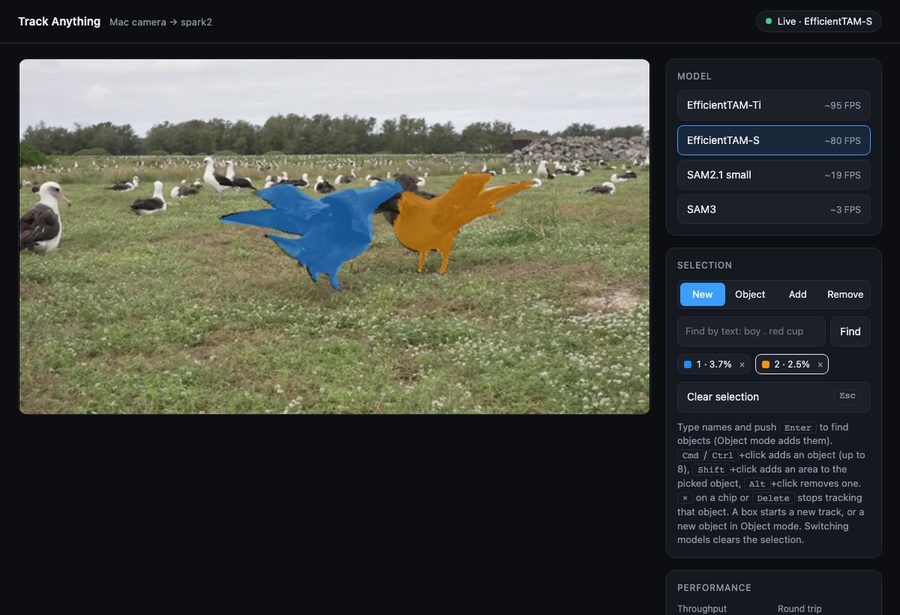
Segment Anything models can do this. You select an object one time, with a point, a box or a name. The model then finds the same object in each new frame and marks its pixels. This marked area is the mask.
The project is TrackAnything. It runs three trackers (EfficientTAM, SAM 2.1 and SAM 3) on an NVIDIA DGX Spark. The Mac only shows the camera and the result. In this post, I show how the pieces fit together, what the numbers say, and where the method is wrong.
What it does
The project has three tools:
- Offline benchmark (
track.py). It tracks objects through a video file, measures the speed and writes a video with the masks. - Live app (
live.pyandlive.html). The Mac camera sends frames to the DGX Spark. The browser shows the masks on the live video. - Personal data removal (
tools/anonymize.py). It prepares a phone video for use as a public sample. It keeps the subject sharp, blurs the rest, pixelates text and faces on the subject, and removes the metadata and the sound.
How the tracker works
These models do not detect objects and then match them between frames. They do segmentation with memory. Each frame goes through these steps:
- The image encoder changes the frame into a grid of features. This step uses most of the compute.
- On the first frame, the mask decoder uses your point or box to make the first mask.
- On the next frames, the features attend to a memory bank. The memory bank holds the prompt frame, 6 recent frames with their masks, and up to 16 object pointers.
- The mask decoder makes a grid of logits. A logit above 0 means "object".
- The memory encoder combines the new mask with the features. The result goes into the memory bank for the next frame.
EfficientTAM keeps the SAM 2 design and changes two parts. It uses a small plain ViT as the image encoder, and it makes memory attention less expensive. On the Spark, this gives approximately 4 times the speed of SAM 2.1 small in the live app.
The live data path
All traffic goes through one SSH tunnel, and the server binds to 127.0.0.1 only. The browser gives camera access only to pages from localhost or HTTPS. The tunnel makes the page a localhost page on the Mac.
For each frame:
- The page captures the camera, at most 640 pixels wide.
- The page sends one JPEG over a WebSocket.
- The Spark decodes the JPEG on the GPU with nvJPEG.
- The tracker runs on the frame.
- The server sends the low-resolution logits back as raw float16 values.
- A WebGL2 shader on the Mac upsamples the logits and draws the mask over the video.
The page sends the next frame when the reply arrives. There is one frame in flight, so there is no queue. The camera preview does not depend on the server. If the server stops, the video continues.
Why raw logits? I first tried uint8, because it is smaller. The clamped values moved the mask edges, and the IoU with the server mask fell to 0.91. With float16, the shader gives the same mask as the server (IoU 1.0 over 100 frames). The cost is 32 KiB per object per frame for EfficientTAM.
EfficientTAM has no streaming API, only an offline video predictor. So live.py adds each frame to the video state and runs the predictor on that one frame. It also removes history older than 16 frames. Without corrections, memory use and latency stay constant for any track length.
Try it
You need SSH access to a GPU host, with uv installed. My host is spark2. To use a different host, set HOST.
To track one object in a video file, do this step:
./run_spark2.sh data/albatross.mp4 --point 470,260 --out results/birds.mp4
To use the live app, do these steps:
- Run
./live_spark2.sh --model etam-s. - Wait for the browser to open
http://localhost:8765. - Allow camera access.
- Click an object, or drag a box around it.
To stop the live app, run pkill -f live_spark2.sh. This command also stops the server on the host.
What the numbers say
Offline, on the Spark, with one object on 300 frames at 960 × 540:
| Model | FPS (3 runs) | Peak GPU memory |
|---|---|---|
| EfficientTAM-S | 94.3 / 78.5 / 102.9 | 1282 MiB |
| EfficientTAM-Ti | 111.0 / 93.6 / 112.3 | 1218 MiB |
| SAM 3 tracker | 2.7 / 2.7 / 2.7 | 9344 MiB |
Live, over the WebSocket, on 640 × 360 frames. The test client ran on the Spark, so these values do not include the network:
| Model | Throughput | Round trip (median) |
|---|---|---|
| EfficientTAM-Ti | 93.0 FPS | 9.7 ms |
| EfficientTAM-S | 83.4 FPS | 10.9 ms |
| SAM 2.1 small | 19.2 FPS | 50.7 ms |
| SAM 3 tracker | 2.9 FPS | 341 ms |
In the browser, the camera frame rate is the limit, usually 30 FPS.
SAM 3 runs at approximately 1/38 of the speed of EfficientTAM-S. But it gives a better mask on this clip. It keeps the spread wing of the bird, and EfficientTAM-S loses part of the wing in some frames. Speed is not free.
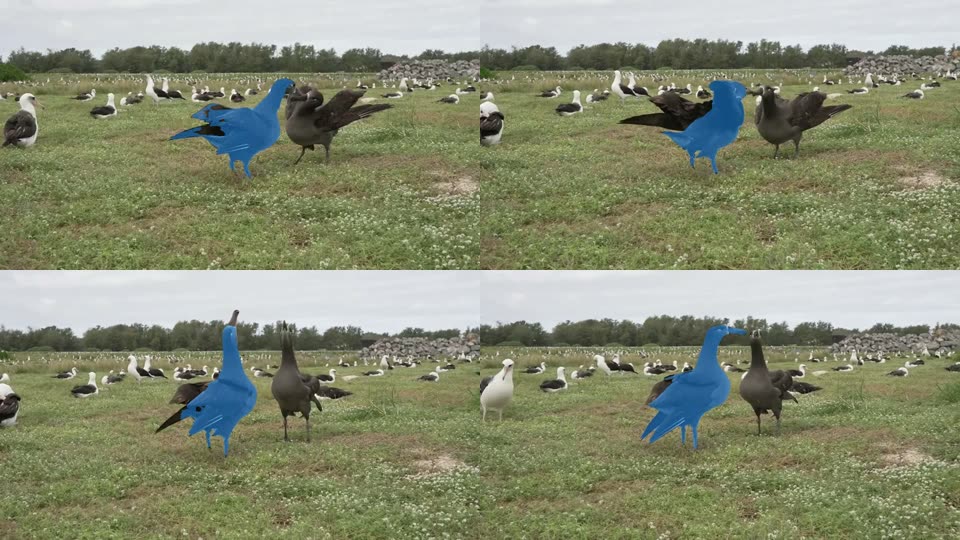
More objects cost more time. The image encoder runs one time for each frame, but memory attention and the mask decoder run for each object. EfficientTAM-S gives 102, 62 and 35 FPS for 1, 2 and 4 objects. This is why the live app stops at 8 objects.
Find objects by name
A click needs a person. A name does not. I type dark bird, and a detector finds the boxes on one frame. Each box becomes a prompt, and the tracker follows the object after that. This is the Grounded-SAM-2 pattern: detect one time, then track.
I compared detectors on the same clip, with three objects on three frames:
| Detector | Box IoU | Time (bf16) |
|---|---|---|
| Grounding DINO tiny | 0.846 | 207 ms |
| MM Grounding DINO tiny | 0.868 | 207 ms |
| LLMDet tiny (used) | 0.866 | 208 ms |
| LLMDet base | 0.878 | 243 ms |
| OmDet-Turbo tiny | 0.540 | 33 ms |
| SAM 3 image model | 0.894 | 685 ms |
I use LLMDet tiny. It has an Apache 2.0 license, and it needs no new dependency. OmDet-Turbo is 6 times faster, but it did not find rocks, and that gives it the low IoU. The detector runs one time for each query, so 0.2 seconds is acceptable. The first query takes 5.7 seconds, because it loads the detector. After that, the first mask comes in 232 to 243 ms, and two objects track at 57 to 58 FPS.
I did not use YOLO or YOLOE. They are AGPL-3.0, and I have no Ultralytics license.
The detector can be wrong. In one test, the query rocks found the rock pile and also a white bird. Always look at the masks.
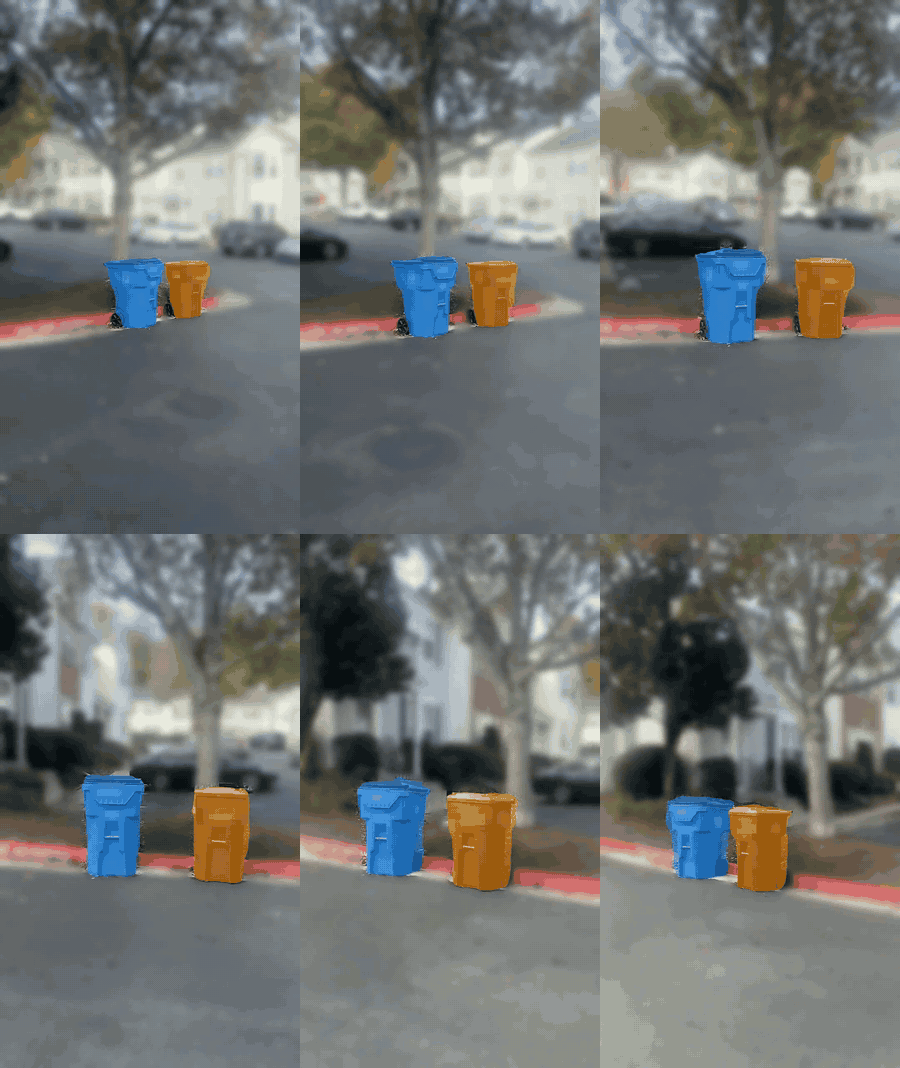
garbage can . trash can found both cans on frame 0. EfficientTAM-S tracked them at 61.9 FPS. This clip is a phone video. The personal data removal tool blurred the street and pixelated the house numbers on the cans.Correct a track
Tracks go wrong. In the live app, Shift+click adds an area and Alt+click removes one. My first version only added these points to the current frame, and it did not work. On a frame that the model already tracked, memory attention overrides the clicks. SAM 2.1 kept a mask of 1.8% of the frame with two add points on the object.
The fix has three parts:
- The frame runs again as a new prompt frame, without memory attention.
- The current logits go into the mask decoder with the points. This is the interactive refinement that SAM is trained for.
- The older memory of that object goes away. If it stays, it cancels the correction after a few frames.
The same function does this for the live app and for track.py. With --fix-box, you set a new box on a later frame, and the tracker runs again from there:
./run_spark2.sh data/albatross.mp4 --point 470,260 --fix-box 75:1:548,172,742,315
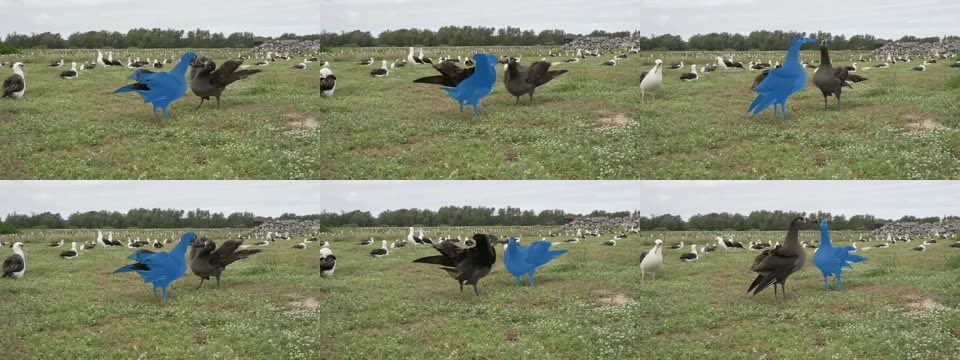
The models do not agree on correction points. Two add points on the other bird move the track to that bird on EfficientTAM-S. EfficientTAM-Ti and SAM 2.1 ignore them. Two remove points on a bird leave 40% of the bird on EfficientTAM-S, 64% on EfficientTAM-Ti and 6% on SAM 2.1. SAM selects one object here, so a remove point cuts the object. It does not separate two objects.
Objects that come in later
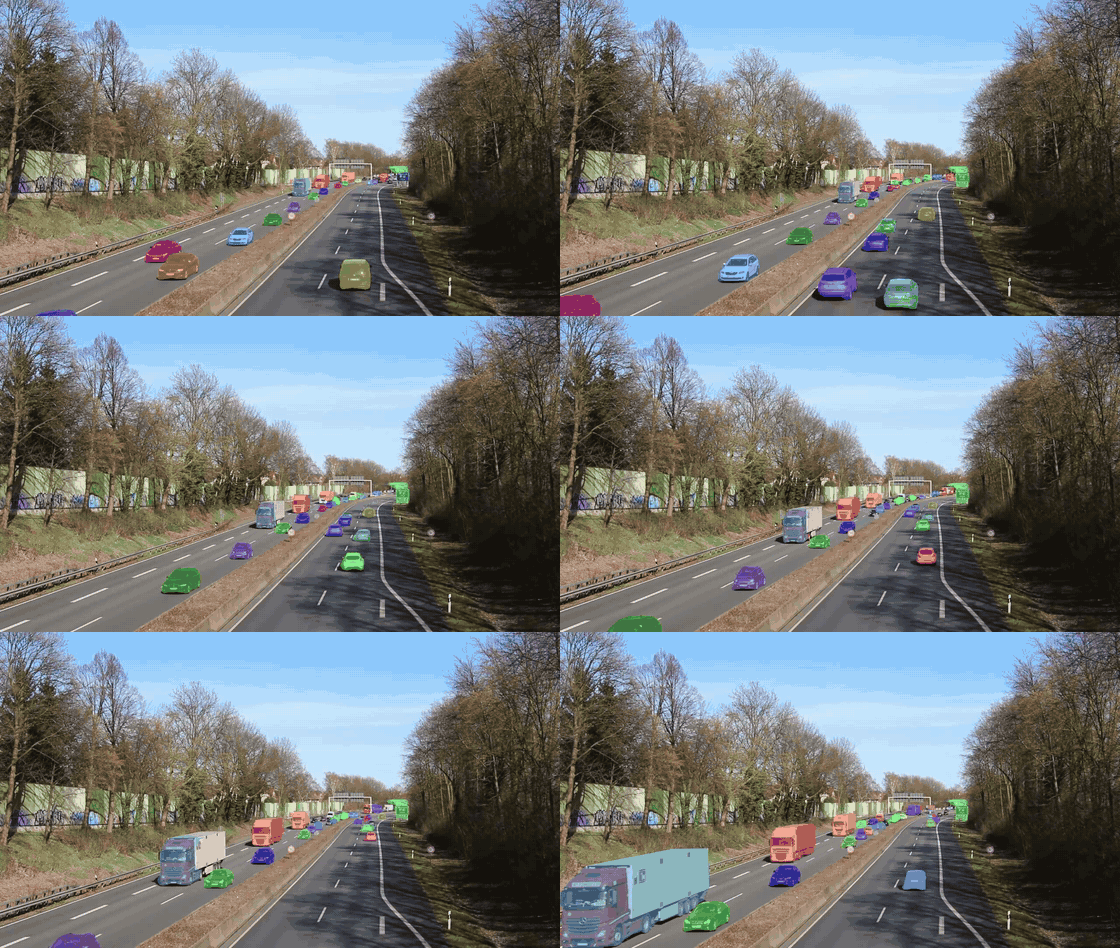
Detect one time, then track, has a clear problem. An object that comes into the frame later has no mask. On the motorway clip, cars come onto the right road from under the bridge. The cars that come after frame 0 had no mask.
The option --redetect 15 runs the detector every 15 frames. The hard part is duplicates, because the detector finds the tracked objects again.
- Known boxes. The tool ignores a box that has a box IoU of 0.5 or more with the box of a tracked mask.
- New masks. A new box becomes an object for one frame. If another mask covers 50% or more of the smaller mask, the tool removes the new object.
- Ended tracks. The tool ends a track after 15 frames with an empty mask.
- Background. The tool also ends a track when its mask covers 25% or more of the frame. On one wide clip, a mask covered all of the ground.
My first rule was wrong. I treated a box that contained most of a mask as a known box. A test showed the error: when one object stands in front of another, its box contains the mask of the second object. The first object then gets no track. So now only the first mask decides.
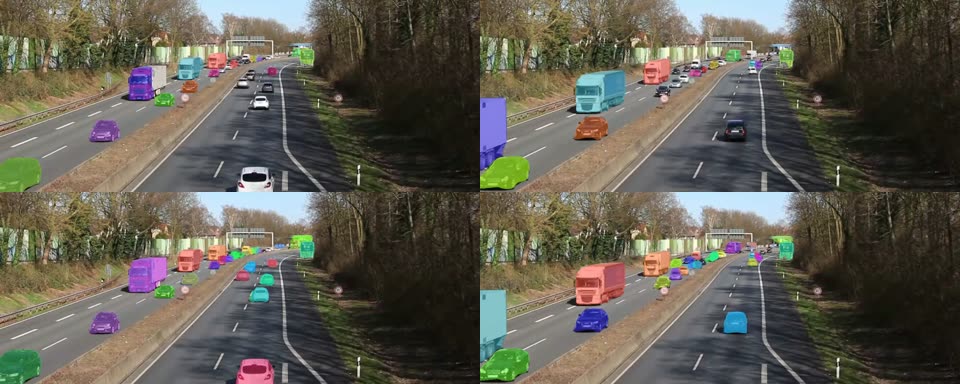
--redetect 15. Same video and credit as the first figure, cropped.On the motorway clip, this gives 52 objects at 2.0 FPS, against 19 objects at 3.8 FPS with one detection. The detector is not the cost. It uses 4.4 of the 149 seconds. Most of the time is memory attention for each object. It also removed 217 duplicates, so the check does real work.
Limits
- The server has one shared tracker, so it accepts one viewer at a time. A second tab shows "Busy · retrying".
- The server has no password. It accepts pages from
localhostonly. Programs on the Mac and on the host can connect. --redetectis offline only. In the live app, the detector would stop the frame loop for 0.2 seconds each time.- In a dense group, masks join. An object that goes away for more than 15 frames gets a new number.
- The detector took a road sign for a vehicle on the motorway clip.
- The personal data removal needs a check by a person. It can miss text.
- I judged duplicates from sample frames. I did not measure them on each frame.
- The test suite has 37 tests on EfficientTAM-S. On SAM 2.1 and EfficientTAM-Ti, I ran only part of it.
What is next
- Tracking by detection without YOLO: an Apache or MIT detector on each frame, plus MIT ByteTrack, for crowds where speed is more important than identity.
- A way to use periodic detection in the live app without a stop in the frame loop.
The code is on GitHub at mraad/TrackAnything, under Apache 2.0. The full manual is docs/index.html in the repository. It has the procedures, the WebSocket messages and the test results.
More to come.

Comments