FELN Decisions: Teaching a Small Model Which Layers a Question Needs
When Unsloth published its guide on how to train your own decision model, I immediately thought of the North Sea. In Lunar Laya, I argued that a model should take a state and some text, and return a structured, measurable answer. Here was a way to turn any small LLM into exactly that kind of model, with a probability attached to every answer. So I had to try it on FELN.
A quick recap for new readers. FELN (Find Existing Location with N layers) is the little query language behind my RAG, LoRA, Liquid and WebGPU experiments. A question such as “Find gas wells within 5 km of oil pipelines” becomes a plan with three parallel lists: layers, where and relations. The first layer is the one returned; any other layer only filters it through a spatial relation.
All those projects generate the whole plan in one go. This time, I wanted to pull out the very first decision and give it to a model that does nothing else: which layers does this question need, and which one is primary? One, two or three of Wells, Pipelines and Discoveries. If that decision is wrong, nothing downstream can save the query. And if the model is unsure, I would much rather know it before generating SQL.
A decision model does not write text
This is the part that caught my attention. Unsloth's decision models do not generate tokens. The LLM reads the input and the list of options once, and a small head (the same design as Cloudflare's Clef) scores every option. After training, Unsloth fits a temperature on held-out data so that the probabilities match how often the model is actually right. The request shape is the same state plus questions used by Laya and the System One API, so a FELN question becomes:
{
  "state": "Locate injection pipelines that cross any gas discoveries.",
  "questions": {
    "layers": {
      "type": "choice",
      "instructions": "Which North Sea layers does this map query need? ...",
      "criteria": {
        "Wells": "Return wells only; no other layer is involved.",
        "Wells+Pipelines": "Return wells, constrained by pipelines.",
        "Pipelines+Discoveries": "Return pipelines, constrained by discoveries.",
        "...": "12 options in total"
      }
    }
  },
  "gold": {"layers": "Pipelines+Discoveries"}
}
Why 12 options? Each option is the primary layer plus the unordered set of secondary layers: 3 single-layer options, 6 pairs and 3 triples. I considered asking separate questions (how many layers, which one is primary, and a yes/no per layer), but those answers can contradict each other: “two layers” plus three layers marked present. One choice is always consistent. The order of the secondary layers is deliberately not part of the label, because the FELN comparator already matches secondaries by name.
Why this is harder than it looks
My first instinct was that a keyword search would handle most of it. I wrote the baseline anyway: find the layer names in the text and call the first one mentioned primary. It gets the primary layer right 93% of the time, but the exact combination only 47% of the time.
The reason is subtype words. People say “Find shows within 3 kilometers of condensate,” not “Find wells whose content type is shows within 3 kilometers of discoveries whose type is condensate.” And the vocabularies overlap. Wells, Pipelines and Discoveries all have a gas type. Condensate exists in both Pipelines and Discoveries. Is that “condensate” a pipeline or a discovery? Sometimes the text simply does not say. I listed each layer's subtype words in the question's instructions, since the head reads them along with the input.
The data and the machine
The training data is the same FELN.json I generated from the NorthSea project's Layers.json catalog and humanized with a local model: 3,000 questions, of which 498 use one layer, 1,659 use two and 843 use three. I split it 80/10/10, stratified by label: 2,400 for training, 300 for validation and calibration, and 300 for a test that nothing else touches.
Training ran on a cloud box with four NVIDIA RTX PRO 6000 Blackwell GPUs (96 GB each). I installed Unsloth into a fresh environment and launched every job inside tmux, so a dropped connection never killed a run. The recipe follows the guide: 4-bit LoRA at rank 16, learning rate 2e-4, batch 8 with gradient accumulation 4, and 3 epochs instead of 2 because the dataset is small. That is 225 steps. A 20-step smoke test on Qwen3.5-4B already jumped from 5.7% to 76% in about 99 seconds, which told me the setup was sound.
And guess what? Once the first full run worked, I had four GPUs sitting there. So instead of splitting one small job across them, I ran one model per GPU in parallel: Qwen3.5 at 0.8B, 2B and 4B, Gemma 4 E2B and E4B, Llama 3.2 3B, and Laya itself, which trains in 16-bit on its ModernBERT encoder.
Results
All numbers are on the same 300 held-out test questions. “Exact” means the primary layer and the full layer set are both right. ECE is the calibration error after calibrating on the validation split. The last column keeps only answers with a confidence of at least 0.7.
| Model | Exact | ECE | Confidence ≥ 0.7: kept / right | Training | Merged size |
|---|---|---|---|---|---|
| Keyword baseline | 47.3% | ||||
| Gemma 4 E4B | 95.3% | 0.030 | 93% / 98.2% | 10.7 min | 15 GB |
| Qwen3.5-0.8B, rank 64 | 95.3% | 0.025 | 88% / 98.9% | 4.5 min | 1.7 GB |
| Qwen3.5-2B | 95.0% | 0.032 | 90% / 98.5% | 5.2 min | 4.4 GB |
| Qwen3.5-4B | 94.3% | 0.021 | 89% / 98.5% | 8.2 min | 8.8 GB |
| Qwen3.5-0.8B, rank 16 | 94.3% | 0.018 | 89% / 98.5% | 4.9 min | 1.7 GB |
| Llama 3.2 3B | 94.3% | 0.034 | 89% / 98.5% | 5.6 min | 6.3 GB |
| Gemma 4 E2B | 91.7% | 0.037 | 91% / 97.1% | 7.6 min | 9.7 GB |
| Laya (ModernBERT, 16-bit) | 90.3–92.0% | 0.020–0.041 | 85% / 96.5% | 2 min | 808 MB |
Now the best part: the tiny Qwen3.5-0.8B scores exactly the same as the 4B, trains in under five minutes, and has the best calibration of the bunch. The best runs get the number of layers right on every test question. Every remaining mistake is a two-layer question where the model picks the wrong second layer. Laya, used as-is, scores at chance on this task (8.3%) and is very overconfident. Two minutes of training take it past 90%, which is impressive for an 808 MB model.
The confidence is the feature I care about most. With the 0.8B model, if I only accept answers at 0.7 or above, it answers 89% of the questions and gets 98.5% of those right. The remaining 11% can go to a fallback: ask the user, or hand the question to a bigger model. A text generator gives me a plan whether it is sure or not. This gives me a number I can route on.
But I have to be honest about what the table does and does not show. With 300 test questions, one question is worth a third of a point. Changing only the random seed moved the 0.8B by 0.6 points, and two identical Laya runs differed by 1.7 points. So everything between 93.7% and 95.3% is a tie, and I am not crowning Gemma, Qwen or Llama the winner here. More epochs did not help either: five epochs made the 0.8B more confident without making it more accurate.
Where the errors come from
Across all the runs, only four test questions are missed by every model. Three of them look like “List all oil/gas wells within 15 kilometers of gas.” Is that second “gas” a pipeline or a discovery? The label says discovery; the text could support either. The 0.8B model is unsure about all three, at 0.62, 0.64 and 0.76 confidence. Two of them fall below my 0.7 gate and would go back to the user. The third slips through, a reminder that a gate reduces mistakes but does not remove them.
The fourth one surprised me. The text reads “Show oil wells ... within 1 kilometer of salt pipelines,” but the label says oil pipelines near salt wells. Salt is a well type, so the original generator sentence was right, and the paraphrasing step swapped the two layers. Every model answered what the text actually says. I found another row where the paraphrase dropped the only word naming a layer. So part of the 95% ceiling comes from my own humanized data, not from the models. I left those rows in the numbers, and fixing the humanizer to always keep layer nouns is now on my list.
A page to play with it
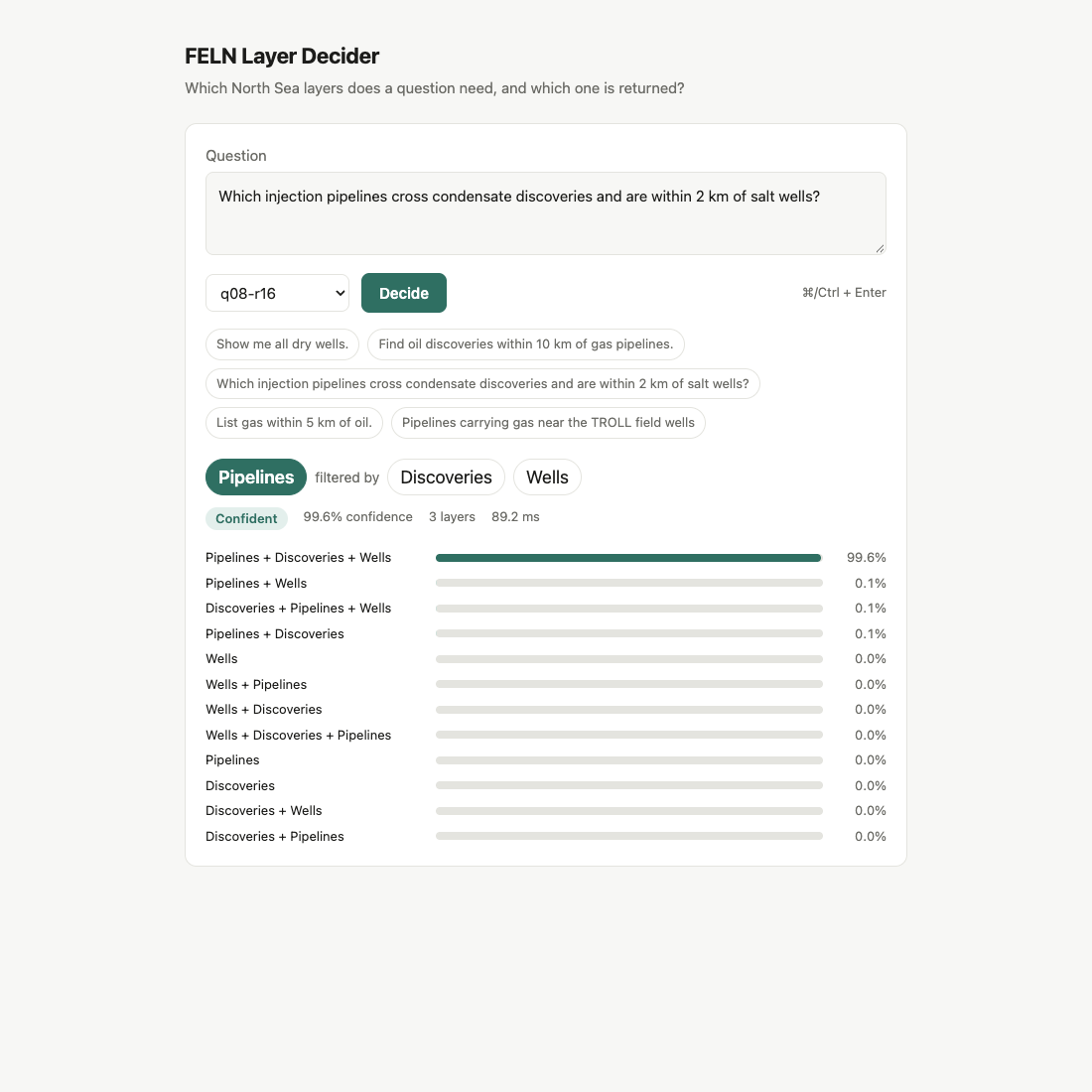
Of course, I wanted to type my own questions. I added a small FastAPI service that loads any trained run on demand and calls FastDecisionModel.predict, with a single-file vanilla JavaScript page on top. Pick a model, type a question, and you see the primary layer, the layers filtering it, the confidence, and the probability of all 12 options. After the first request loads the model, an answer comes back in about 85 milliseconds.
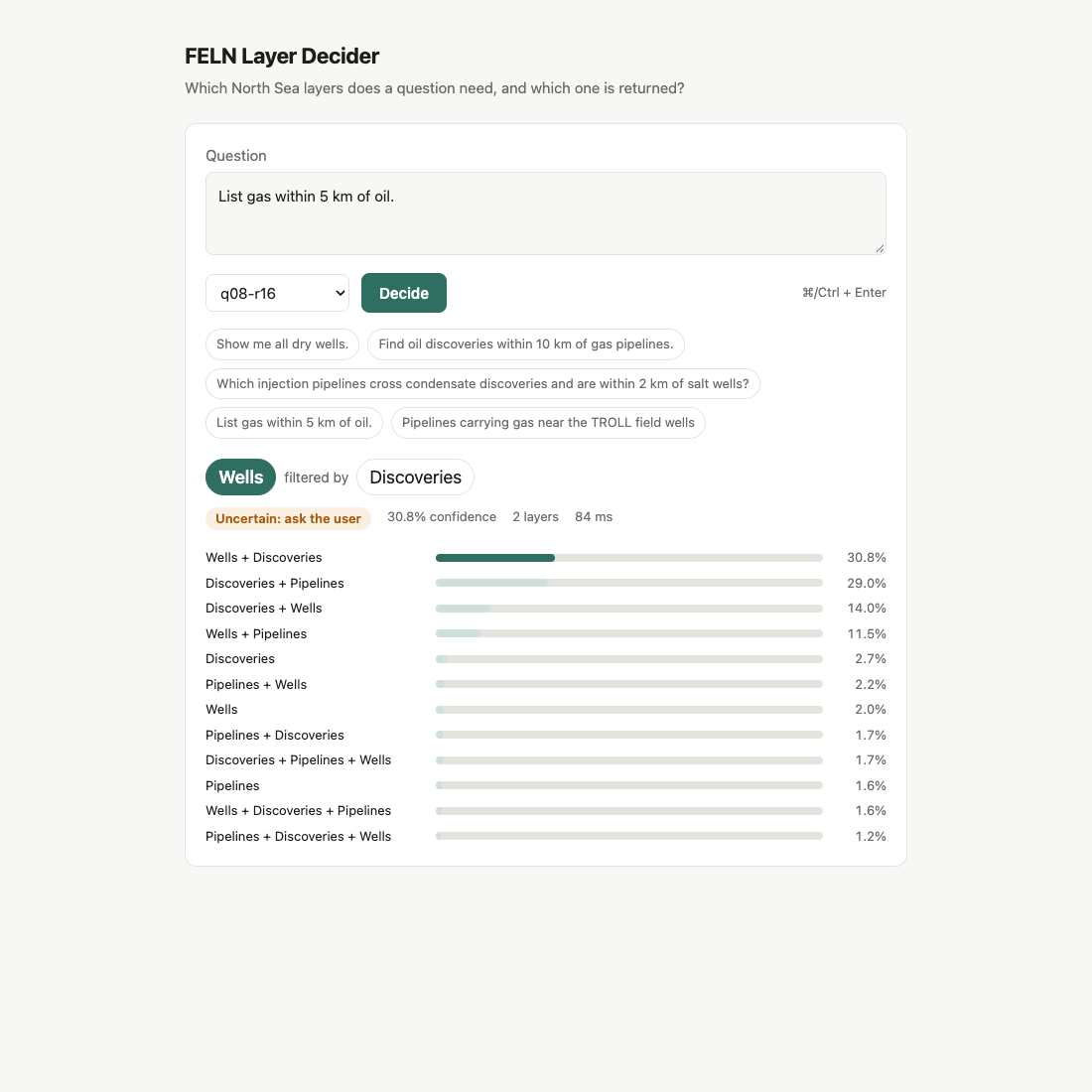
That screenshot is my favorite result of the whole experiment. A clear question such as “Find oil discoveries within 10 km of gas pipelines” comes back as Discoveries filtered by Pipelines at 0.94. A genuinely ambiguous one spreads its probability across several answers instead of pretending. I did not have to write a single rule for that.
And here is the other end of the spectrum. A question that names all three layers, with a subtype for each, comes back with no doubt at all:
Try it yourself
You need a machine with an NVIDIA GPU for training and for the web page's backend. The 0.8B model is small: its training runs used a few GB of GPU memory. Unsloth's guide also lists a desktop app for macOS, Windows and Linux, but I used the Python route. Everything below runs from a clone of the repository.
First, the environment and the data. prepare.py uses only the standard library. It turns a FELN.json file into the training, validation and test rows, and prints the two baselines. The repository already includes the exact splits I used under data/, so you can skip that step.
git clone https://github.com/mraad/feln-unsloth.git
cd feln-unsloth
uv venv -p 3.12 .venv
uv pip install -p .venv/bin/python unsloth datasets fastapi uvicorn

# optional: rebuild data/ from your own FELN.json
python3 prepare.py path/to/FELN.json data
Then train a model. I run this inside tmux, so a dropped SSH connection does not end the run. It takes about five minutes for the 0.8B model and writes the adapter, a merged model, the metrics and every test prediction under runs/q08-r16:
tmux new -s feln-unsloth
CUDA_VISIBLE_DEVICES=0 .venv/bin/python train.py \
  --model unsloth/Qwen3.5-0.8B --out runs/q08-r16

# a quick question from the command line
.venv/bin/python predict.py runs/q08-r16/adapter \
  "Find oil discoveries within 10 km of gas pipelines."
Finally, start the web page. app.py is a small FastAPI service, and it serves the single-page application (index.html, plain JavaScript with no build step) from the same port. Every trained run under runs/ shows up in the model picker.
CUDA_VISIBLE_DEVICES=0 .venv/bin/python -m uvicorn app:app \
  --host 127.0.0.1 --port 8095
Open http://localhost:8095 on the same machine. My GPU box is in the cloud, so I keep the service on localhost and reach it from my Mac through an SSH tunnel instead of opening a port. There is no authentication on this little tester.
ssh -fN -L 8095:127.0.0.1:8095 my-gpu-box
open http://localhost:8095
The first question takes about 14 seconds while the model loads. After that, each answer takes well under a second. The page also exposes a tiny JSON API if you want to call it from your own code:
curl -s -X POST http://localhost:8095/api/decide \
  -H "Content-Type: application/json" \
  -d '{"text": "Show me all dry wells.", "model": "q08-r16"}'
What this does and does not show
The test questions come from the same generator and humanizer as the training questions, so these numbers describe synthetic North Sea wording. I have not measured accuracy on questions from real users, and those will be messier. I also did not benchmark inference speed or memory beyond the web tester, and I have not tried serving it through Unsloth Studio's Decision API. One last detail for the curious: Unsloth's built-in evaluate and the per-question predict disagreed by one to three questions on a few runs. It is not batching. I report the predict numbers, since that is the serving path.
What is next
I see this decision model as a router in front of the FELN generators rather than a replacement for them:
- Decide the layers first with a calibrated probability, then let the LoRA or WebGPU model generate a plan constrained to those layers.
- Send low-confidence questions back to the user with the two top candidates, such as “Did you mean condensate pipelines or condensate discoveries?”
- Fix the humanizer so a paraphrase can never drop or swap a layer noun, then retrain.
- Try the 0.8B or Laya locally on the Mac, next to the rest of the FELN pipeline.
The code, data splits, per-question predictions for every run, and a detailed report are on GitHub in feln-unsloth. Big thanks to the Unsloth team for making this so approachable. The guide got me from zero to a calibrated model in an afternoon. If you have a GIS task with a fixed set of answers, I would love to hear where you would plug in a model like this. More to come!


Comments