DuckDB Jev Spatial: Jev-Style SQL Decisions with a Local Laya Model
When DuckDB published Jev and DuckDB: Plain-English Conditions in SQL, I wanted to try it on my North Sea wells and pipelines right away. The idea is simple and powerful. You write a plain-English condition inside a SQL query, and a decision model answers it for each row. But those Jev functions send the row data to the hosted TypeSafe API, and that needs an API key.
I already had Laya, an open-weight decision model, running on my Mac from Lunar Laya. So I asked a direct question: can the same SQL run on a local model, inside DuckDB, with no network at all?
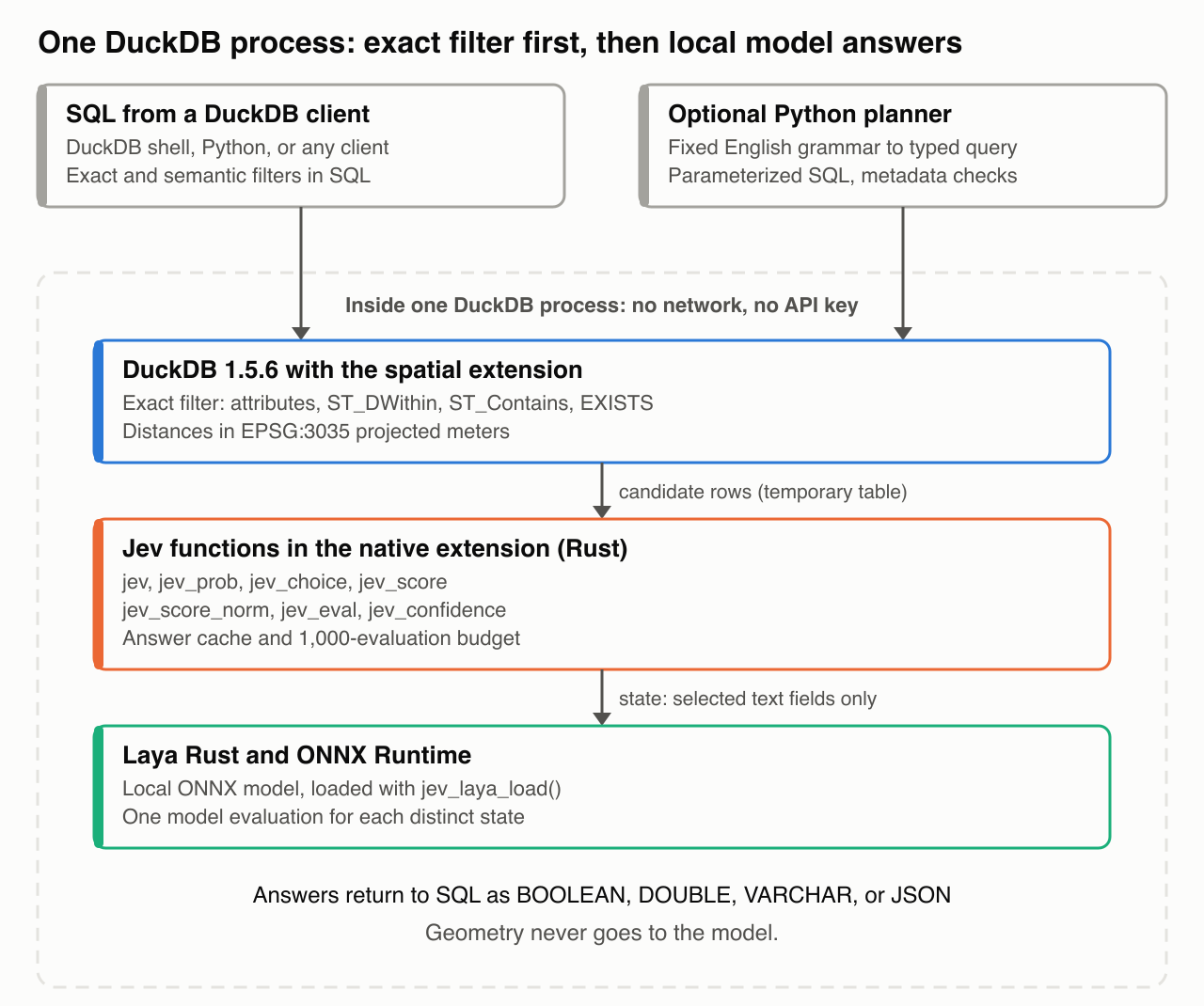
The result is duckdb-jev-spatial. It is a native DuckDB extension, written in Rust, that registers seven Jev functions. Laya Rust and ONNX Runtime run the model inside the DuckDB process. The DuckDB spatial extension does the geometry. In this post, I show how the pieces fit together, what the NorthSea data shows, and where the model is wrong.
Two kinds of conditions
A model that reads one well row cannot find the pipelines near that well. That question needs the pipeline table, a coordinate reference system, and distance units. DuckDB does that work very well. Thus the project uses two kinds of conditions:
- Exact filter: a SQL condition on stored attributes or geometry, for example
water_depth > 350orST_DWithin. - Semantic filter: a condition that uses a Jev function on selected text fields, for example a well status or an inspection note.
The rows that pass the exact filter are the candidate rows. Only the selected text fields of those rows go to the model. Geometry never goes to the model.
Exact first: 106 wells, zero model evaluations
Here is the question that started it: “Show all wells with water depth greater than 350 meters and an in-service pipeline within 5 km.” Each part maps to a stored fact. Water depth is a column. In service is the code IN SERVICE. Distance is a spatial function. And guess what? DuckDB answers it alone, with zero model evaluations.
The NorthSea data stores geometry in EPSG:4326 degrees. The query transforms both geometries to EPSG:3035, so the 5 km limit is in projected meters. Of 9,299 wells, 600 are deeper than 350 meters. Of those, 106 have one of the 63 in-service pipelines within 5 km. An independent minimum-distance query returns the same 106 IDs.
SELECT w.OBJECTID
FROM wells_m w
WHERE w.water_depth > 350
  AND EXISTS (
    SELECT 1 FROM service_pipelines_m p
    WHERE ST_DWithin(w.geom_m, p.geom_m, 5000)
  )
ORDER BY w.OBJECTID;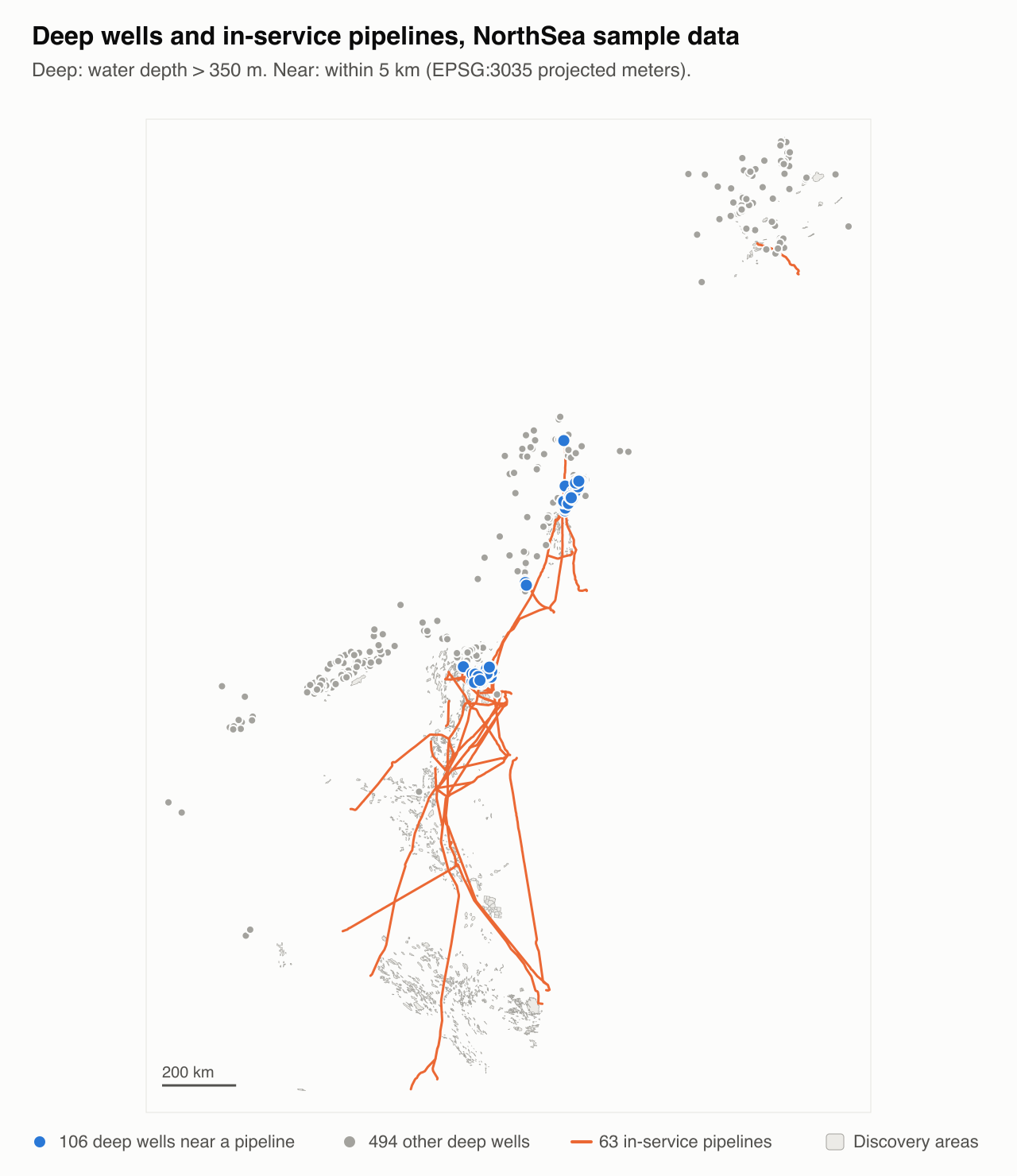
Semantic filters inside spatial queries
Now the best part. A semantic filter can work inside a spatial relation. This query asks for deep wells near a pipeline that the model classifies as in service. The same pipeline must pass both conditions:
SELECT w.OBJECTID
FROM deep_wells_m w
WHERE EXISTS (
  SELECT 1 FROM pipelines_m p
  WHERE ST_DWithin(w.geom_m, p.geom_m, 5000)
    AND jev({'current_phase': p.current_phase},
            'Is this pipeline currently in service?')
)
ORDER BY w.OBJECTID;
It returns 106 wells, and the IDs match the exact IN SERVICE filter. I wrote four mixed examples, one for each spatial pattern:
| Spatial operation | Semantic filter | NorthSea result |
|---|---|---|
ST_DWithin inside EXISTS | jev accepts the pipeline state | 106 wells; IDs match the exact filter |
ST_Intersects inside EXISTS | jev_choice selects the pipeline lifecycle | 52 pipelines; IDs match the exact filter |
ST_Contains inside EXISTS | jev_prob accepts the well status | 4 areas; 1 correct and 3 false positives |
Lateral query ordered by ST_Distance | jev selects the eligible pipelines | 600 pairs; pipeline IDs and distances match |
The containment example is the honest one. jev_prob accepts four discovery areas. Only one area contains a well with an operating status. The other three are false positives.
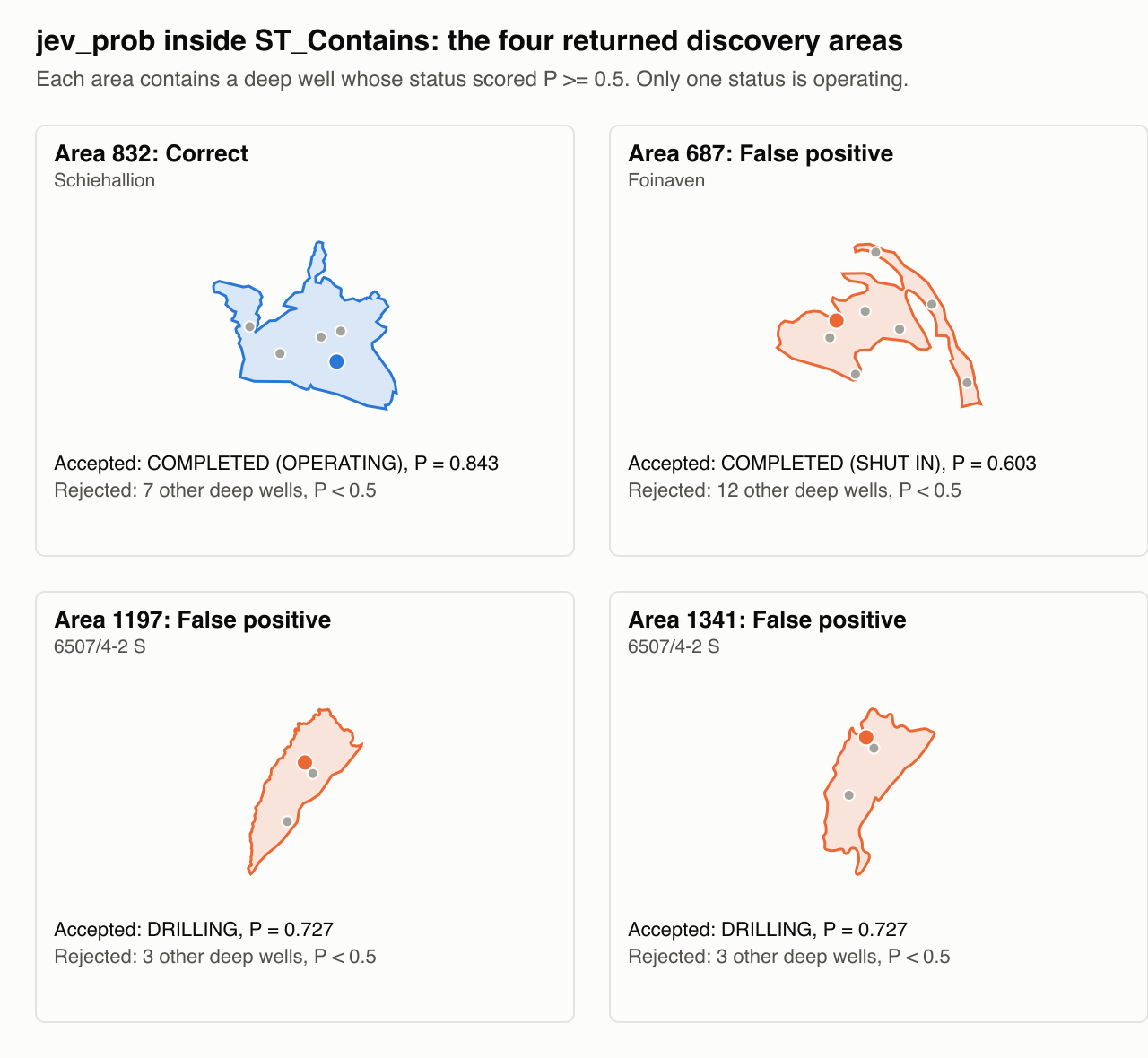
DRILLING and COMPLETED (SHUT IN) score above 0.5.There is one more trap. In one WHERE clause, predicate order does not control evaluation order. DuckDB can send a row to the model before that row passes the spatial condition. When the model must receive only candidate rows, I store them in a temporary table first. Then a second statement applies the semantic filter:
CREATE TEMP TABLE exact_wells AS
SELECT w.OBJECTID, w.status
FROM wells_m w
WHERE w.water_depth > 350
  AND EXISTS (
    SELECT 1 FROM service_pipelines_m p
    WHERE ST_DWithin(w.geom_m, p.geom_m, 5000)
  );

SELECT OBJECTID, status
FROM exact_wells
WHERE jev({'status': status},
          'Does the well status explicitly say that it is operating?')
ORDER BY OBJECTID;
The 106 candidate rows contain seven distinct statuses. The model accepts wells 4918 and 5026 as operating. Both have DRILLING status, so both are false positives. My rule is simple: for a known status code, I use exact SQL. The model is for text that has no code.
Inside the native extension
The extension targets DuckDB 1.5.6 exactly. Its Rust bindings use the unstable DuckDB C extension API. These design choices matter most:
- One answer cache. The cache key contains the state, the question, the kind, and the ordered options. All seven Jev functions share one validated answer. Thus a threshold change or a confidence request needs no new model evaluation.
- A budget. A query cannot start more than 1,000 model evaluations before an explicit reset with
jev_laya_reset(). - Validation before the cache. Each answer must have the correct kind, valid labels, finite probabilities, and a complete distribution. A truncated state or an input larger than 1 MiB causes a query error.
- Diagnostics.
jev_evalreturns the full answer as JSON, with probabilities and confidence fields.jev_confidenceandjev_score_normread the same cached answer.
I also reviewed the source of the upstream C++ duckdb-jev extension. Its cache key omits the configured model and endpoint. Its option delimiters can make two different option lists share one key. The local key is a full JSON tuple, and the tests cover delimiters inside options.
What the checks show
| Check | Result |
|---|---|
| Python tests, with native model checks | 93 passed |
| Native Rust unit tests | 4 passed |
| tev1 outputs | 256/256 valid; 250/256 correct |
| tev1 spatial membership cases | 212/212 correct |
| tev1 semantic cases | 38/44 correct |
| Model evaluations in the tev1 run | 25 |
The six semantic failures are three well statuses, each under two answer-letter mappings: BLOWOUT, COMPLETED (SHUT IN), and DRILLING. The model probabilities are not calibrated for NorthSea. A valid typed answer is not a correct answer, so the harness keeps each failure visible.
The cache also pays off. With the answers already in the cache, probability queries ran 2.36× faster and choice queries 2.65× faster than the previous build. That benchmark used 30,000 rows and four distinct states. It does not measure cold inference.
Limits
- I tested only DuckDB 1.5.6 on macOS arm64. The native extension is an unsigned development build.
- The native extension runs one model evaluation for each distinct state. It has no multi-state batching yet.
- The optional English planner accepts a fixed grammar. It accepted none of 3,000 sample corpus questions.
- Distances are projected meters. They are not geodesic distances.
Try it
The full native setup is in the README. It needs the DuckDB 1.5.6 shell, a Rust toolchain, uv with Python 3.12, and the Laya checkout. Do these steps:
- Clone the repository.
git clone https://github.com/mraad/duckdb-jev-spatial.git - Go to the project directory.
cd duckdb-jev-spatial - Extract the sample dataset.
tar -xzf data/NorthSea.tar.gz -C data - Do the native setup in the README.
- Run the eight exact spatial examples.
duckdb -readonly -unsigned data/NorthSea/NorthSea.ddb < native/spatial-examples.sql
The SQL reference describes every Jev function. The validation document shows how to run each check.
Thank you to Geodata for the NorthSea sample data. For more context, read the DuckDB Jev post and the Respan comparison 10 Best Jev Alternatives, which lists Laya as free to self-host.
Next, I want to batch distinct states and build for more platforms. The code, the SQL examples, and the validation records are on GitHub in duckdb-jev-spatial. More to come!


Comments