FELN RAG: Five Examples and a Spatial Query
Ask a GIS person to find oil wells within five kilometers of gas pipelines and they can start breaking the request into pieces. Which layer contains the wells? How is “oil” encoded? Which pipelines carry gas? What spatial operation connects the two?
A language model needs those same details. “Oil” might be a numeric
subtype. A country might be stored as a two-letter code. And choosing
intersects when the question calls for
contains can produce perfectly respectable JSON that asks
the wrong question.
That is the problem behind feln-rag: give the model a description of the data and a handful of relevant worked examples, then ask it to translate a new request into a structured spatial query.
The interesting part is how little machinery the retrieval needs.
Start with the query we want to produce
The output is FELN, a JSON representation with three main pieces:
layers: the primary layer to return, followed by any spatial filter layers.where: one SQL filter per layer, in the same order.relations: the spatial relationship between the primary layer and each secondary layer.
Here is a small example from the bundled
NorthSea corpus. A request for discoveries in the United Kingdom
whose discovery wellbore name starts with 42/30-
becomes:
{
  "layers": ["Discoveries"],
  "where": ["\"country\" = 'UK' AND \"discovery_wellbore_name\" LIKE '42/30-%'"],
  "relations": []
}
One layer, two attribute conditions, and no spatial join. Add another
layer and a distance constraint, and the relationship becomes something
like withinDistance 5 kilometers.
The repository generates this representation. Executing it against geographic data is a separate step. You can explore the translation without having the NorthSea geodatabase on your machine.
Two companion projects supply the foundation. layers-json describes the catalog, including field names, coded values, and hints. feln supplies the output models, validation, and comparison tools.
The vector store is a NumPy array
The bundled corpus contains 1,000 question-and-answer pairs. Each question has a known FELN answer attached to it.
An embedding model converts the question text into a vector. Those vectors become rows in a NumPy array, with each row still associated with its original question and FELN. The new question goes through the same encoder, and retrieval finds the five closest examples.
Because the vectors are normalized to unit length, cosine similarity reduces to this line in the index implementation:
scores = self.embeddings @ query.reshape(-1)At this corpus size, scanning the array is a straightforward place to start. There is no separate vector database service to operate. The embeddings are cached on disk, with the encoder name and ordered question texts contributing to the cache fingerprint.
A similarity score tells us which questions resemble the new request. Whether their answers demonstrate the right spatial logic is something we still have to inspect and measure.
Put the examples where the model can use them
The retrieved examples become a short conversation. Each question is a user message, and its known FELN answer is the following assistant message. The actual question comes last:
System:    Translation instructions and layer catalog
User:      Retrieved question 1
Assistant: Known FELN answer 1
           ...four more question/answer pairs...
User:      The new question
That is the few-shot prompt. The catalog explains the data; the examples demonstrate how to translate requests involving it. The generation code sends those messages through LiteLLM and attempts to parse the response as FELN.
The model has to produce a new answer. Copying the closest example would be a very efficient way to return somebody else's query :-)
Make the context visible
FELN Studio puts the pieces on one page: the question, five retrieved examples, an editable system prompt and catalog, and the generated JSON.
The useful first click is Find examples only. Expand a card and inspect the FELN that will become an assistant message. With the default local encoder, this step does not call the generation model. Generate FELN then uses those displayed examples in their displayed order.
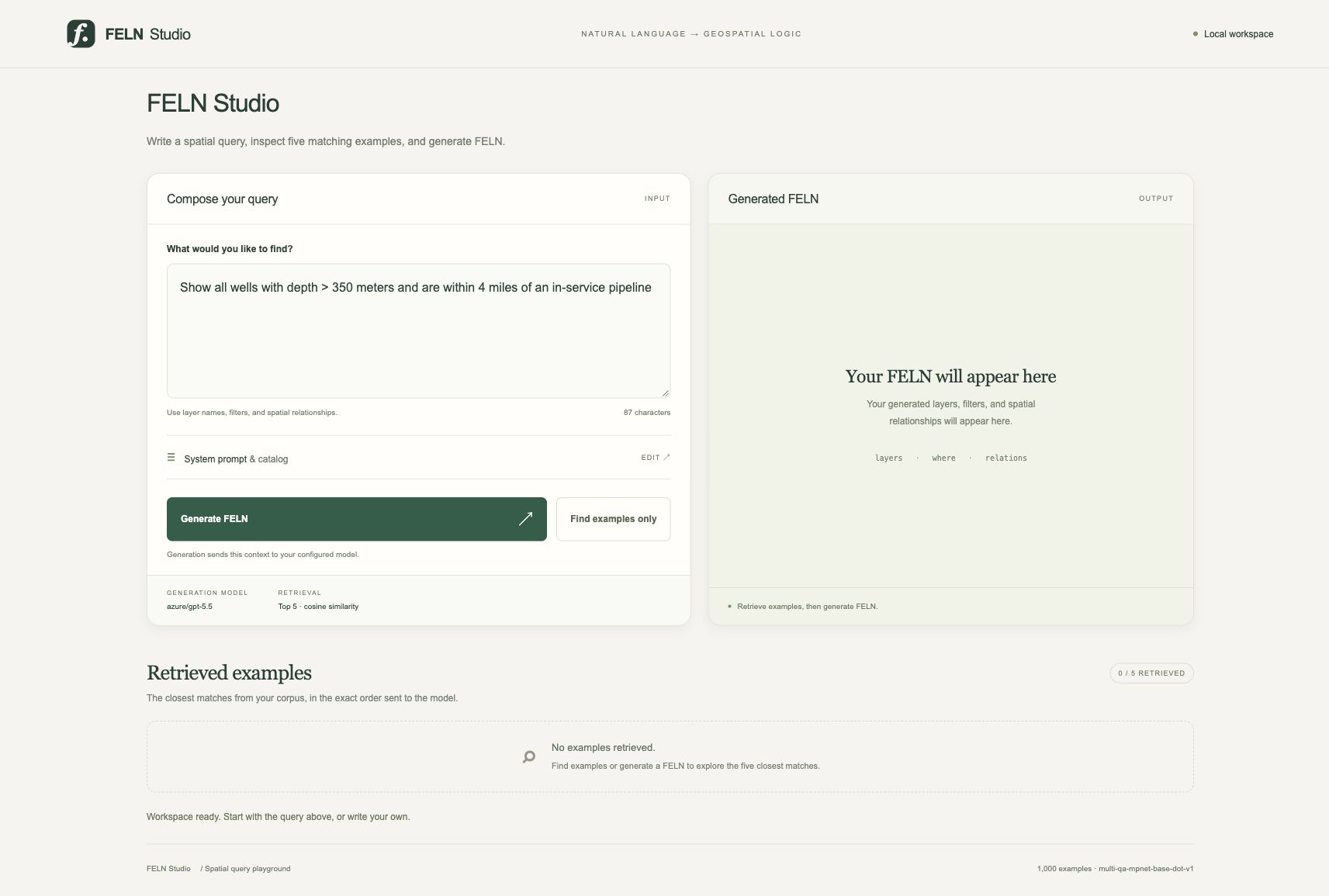
The repository screenshot demonstrates the workspace and retrieval; it does not show a completed generation request.
The interface is plain HTML, CSS, and JavaScript served by Python's standard-library HTTP server. It runs on loopback. Generation sends the question, catalog, and examples to the configured model provider, while credentials stay on the server. The README explains the workflow and configuration.
The VALID FELN label has a precise meaning: the output passed schema validation. You still need to read the query. Valid structure cannot tell you whether the model chose the relationship you intended.
Count the misses, too
The evaluation code separates held-out questions from the retrieval corpus and supports a zero-shot baseline using the same catalog instructions without examples. It records validity, exact match, structural and partial scores, and request failures. Studio uses the full corpus for exploration, so evaluation belongs in that separate holdout workflow. See eval.py.
The repository reports a September 15 smoke test using MPNet
retrieval and azure/gpt-5.5. Retrieval was evaluated on ten
held-out questions; generation used the first three:
| Check | Reported result |
|---|---|
| Matching layer set among the five retrieved examples | 10/10 |
| RAG exact match | 3/3 |
| Zero-shot exact match | 2/3 |
| Generation requests | Six valid outputs, no request errors |
The zero-shot miss selected intersects where the
reference used contains. All six outputs were valid, which
is a useful illustration of why validation and correctness need separate
columns. These are reported
smoke results, and three questions are far too few to establish
general accuracy.
Try it
The current setup requires Python 3.13, uv, and sibling
checkouts of feln, layers-json, and
VectorlessGAIT. That last dependency is currently required
by the package configuration even when using NumPy retrieval. Follow the
setup
instructions, configure LLM_MODEL_NAME and the provider
credentials, then run from the repository:
uv sync
uv run --no-sync python -m feln_rag.web
Open http://127.0.0.1:8765/. The default embedding model
may download its weights on first use.
Start with a question whose answer you understand. Inspect the retrieved examples. Generate the FELN. Then change the distance, reverse the requested relationship, or add an attribute condition and see what moves.
For me, the appeal is being able to follow the translation all the way through: the catalog, the examples, the prompt, and the resulting query. When something goes wrong, there are concrete pieces to examine.
The next useful experiment would be a larger held-out comparison, especially on questions that differ by one spatial relationship or one coded value. Those small differences are where a convincing answer has to become a correct query.
More to come :-)


Comments